Blog
Working With FHIR: Fetching Healthcare Data, Step by Step
A hands-on walkthrough for software engineers, exploring how FHIR makes patient data easier to authorize, access, and build with.
The Gist
Healthcare data is some of the most important data software engineers can work with, and some of the hardest to access cleanly. FHIR helps by standardizing how patient records are authorized, structured, and retrieved through APIs. In this step-by-step overview, Armaghan “Armi” Behlum, director of engineering at AKASA, shows how it works in practice, including how to explore your own data.
Healthcare data is incredibly valuable, but it has historically been difficult for software systems to access, exchange, and interpret consistently. Patient records often live across different portals, providers, formats, and workflows.
FHIR (Fast Healthcare Interoperability Resources) was designed to make that easier.
It provides software engineers with a standardized way to request, authorize, and retrieve healthcare data via APIs. If you want to build an application that programmatically pulls data from an EHR (e.g., Epic), you’ll need to work with FHIR data.
This is something I got to work on firsthand during one of AKASA’s hackathons, our internal program where engineers explore ideas outside the usual roadmap, and it’s a project I fondly look back on.
FHIR standardizes how healthcare data is formatted and transmitted. For example, it standardizes the representations of immunizations, medications, and vitals. The protocol allows for flexibility, meaning real-world implementations can differ between different EHRs and even between systems using the same EHR. That said, despite the variability, FHIR provides a starting point for developers to access raw healthcare data.
The same standards used by healthcare applications can also let patients access their own data, depending on their provider and portal. That means you may be able to authorize access to your records and inspect the FHIR resources yourself.
In this blog, I’ll walk you through how FHIR works, what SMART on FHIR is, and how you can build a FHIR-compatible client application.
What is HL7 FHIR?
FHIR is developed by Health Level 7 International. It defines resources (i.e., data models or shapes) that are commonly exchanged as JSON, though XML and RDF are also supported. These resources translate into rich graphs of data, as any resource can reference others.
A key nuance is that FHIR defines the shape of data, but not the implementation. Different providers and EHR services have occasional differences in how they expose endpoints. For example, Epic and Cerner offer different approaches to querying, filtering, and returning data. FHIR provides a rough template for the underlying JSON, XML, and RDF files, but isn’t an explicit API blueprint.
A helpful analogy for FHIR is that it’s like a filing system. Each file carries data on a specific healthcare category (e.g., vaccinations or vitals). With the file, there is variability. Some are highly structured, especially medical categories that are standardized in an industry, like labs. Others are more open-ended, like clinical notes.
In many cases, a FHIR data record is a wrapper around another file format, such as a PDF.
What is SMART on FHIR?
While FHIR alone doesn’t dictate authorization, it does have a designated protocol for authorization and app launching: SMART. For example, SMART decides “How do you prove that you can access a resource?”
SMART uses a typical OAuth 2.0 / OpenID Connect flow for authentication, retrieving an access token for the user. SMART allows for scoped access so that accounts can be restricted to a subset of FHIR data. Due to SMART, a single clinical app can run across multiple EHRs, as the launch and authentication behavior are standardized.
Who can use FHIR?
Anyone could create a FHIR application, but they would typically need an LLC or company to be accepted into an EHR’s app library.
The example showcased in this post is an application that I built during the AKASA Hackathon to explore FHIR. I was curious about FHIR after learning about older automation approaches (e.g., old school RPA extraction). Given that I’d personally received care from a few providers who used Epic, I wanted to register an application with Epic to pull my own vaccination records via JSON!
A step-by-step breakdown of a FHIR app
To illuminate how FHIR works, I’ll provide a step-by-step breakdown for registering and building a FHIR application.
Registration
To register a FHIR application with an EHR vendor or healthcare system, you’ll need to follow their established developer workflow. The actual process will differ between vendors, but they generally focus on determining if the application is correctly built and serves some patient or clinical purpose.
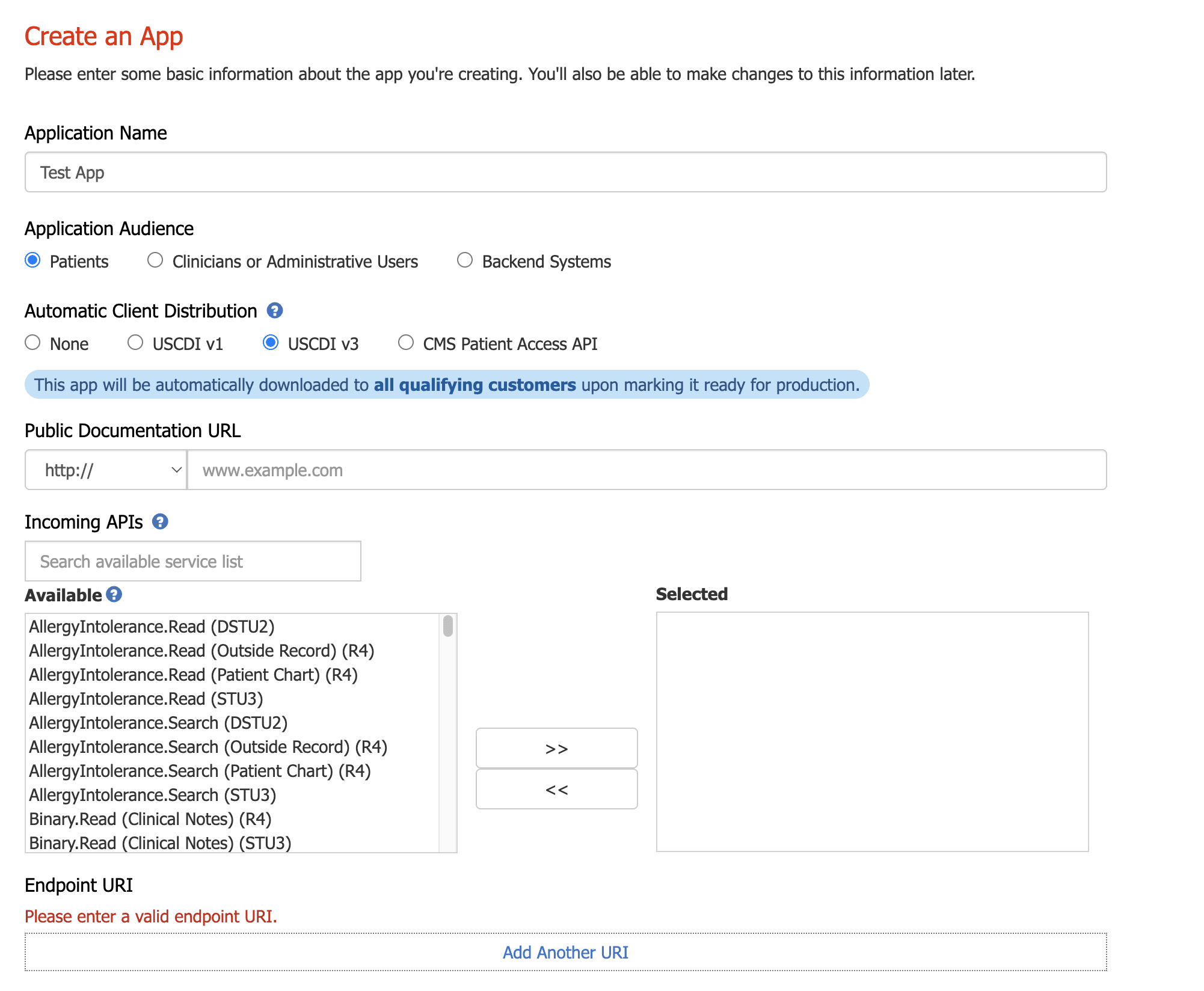
Epic’s app registration process
Epic has a well-documented process. During the flow, you need to configure what resources are pertinent to your application and submit your application’s privacy policy.
Using SMART
Once your application is registered, you'll need to implement the SMART on FHIR flow to authenticate users and obtain access to their data. At a high level, this is the standard OAuth 2.0 dance with a few healthcare-specific wrinkles.
For example, SMART expects applications to dynamically discover auth endpoints rather than hardcode them, given that apps need to work with multiple EHRs, often with ephemeral endpoints. SMART also has a dynamic launch parameter that differentiates applications that are launched independently versus within an EHR like Epic. SMART also helps differentiate between apps launched by the patient or the provider.
Beyond that, SMART implements popular OAuth 2.1 features, such as PKCE, short-lived auth codes, and Bearer tokens.
Usage
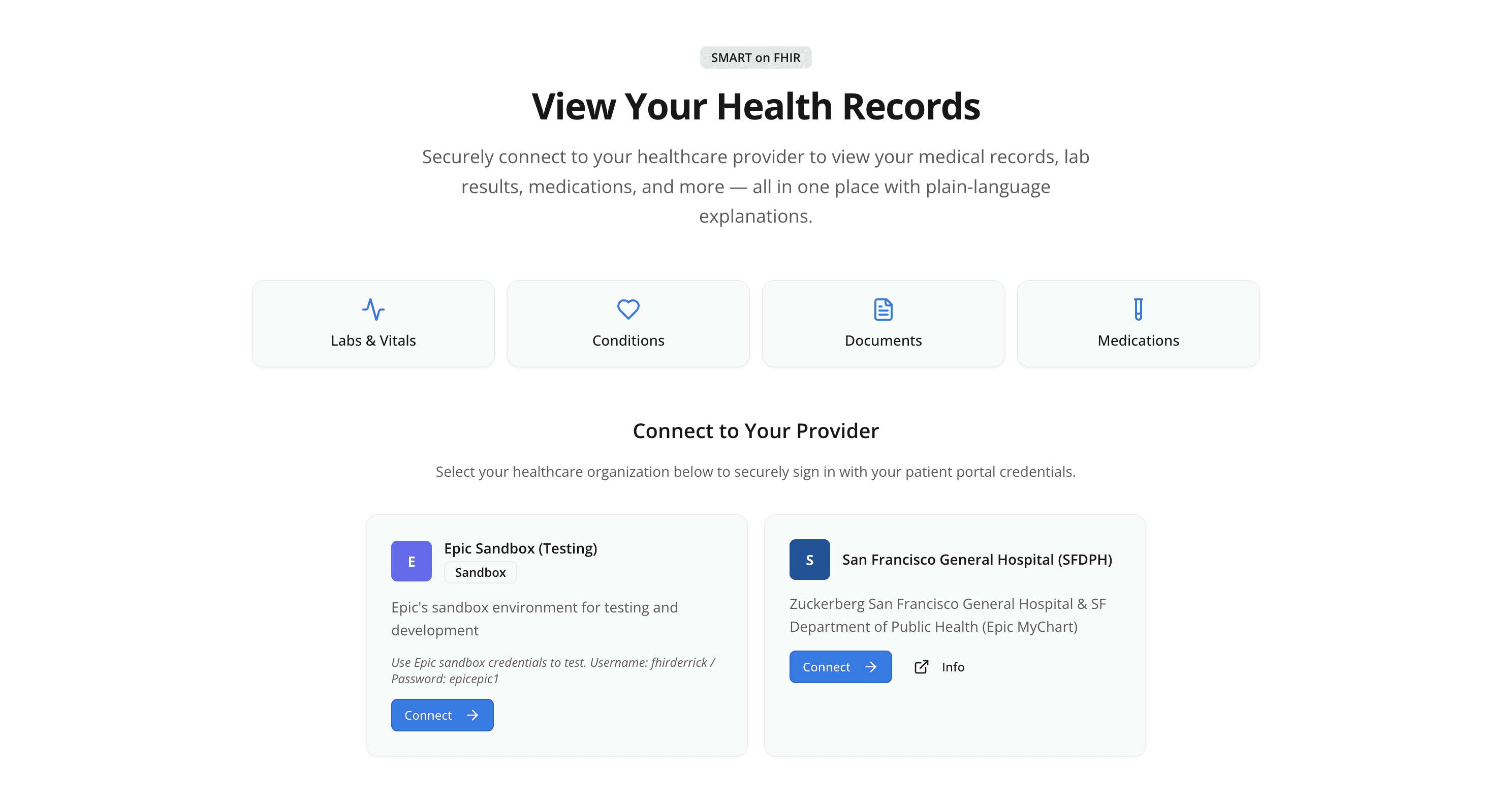
With a launched application, the patient can authenticate into their account and grant the application access to their data. Typically, this means different login portals depending on the patient’s EHR. For example, in my app, I had two launch buttons for Epic Sandbox and SF General respectively.
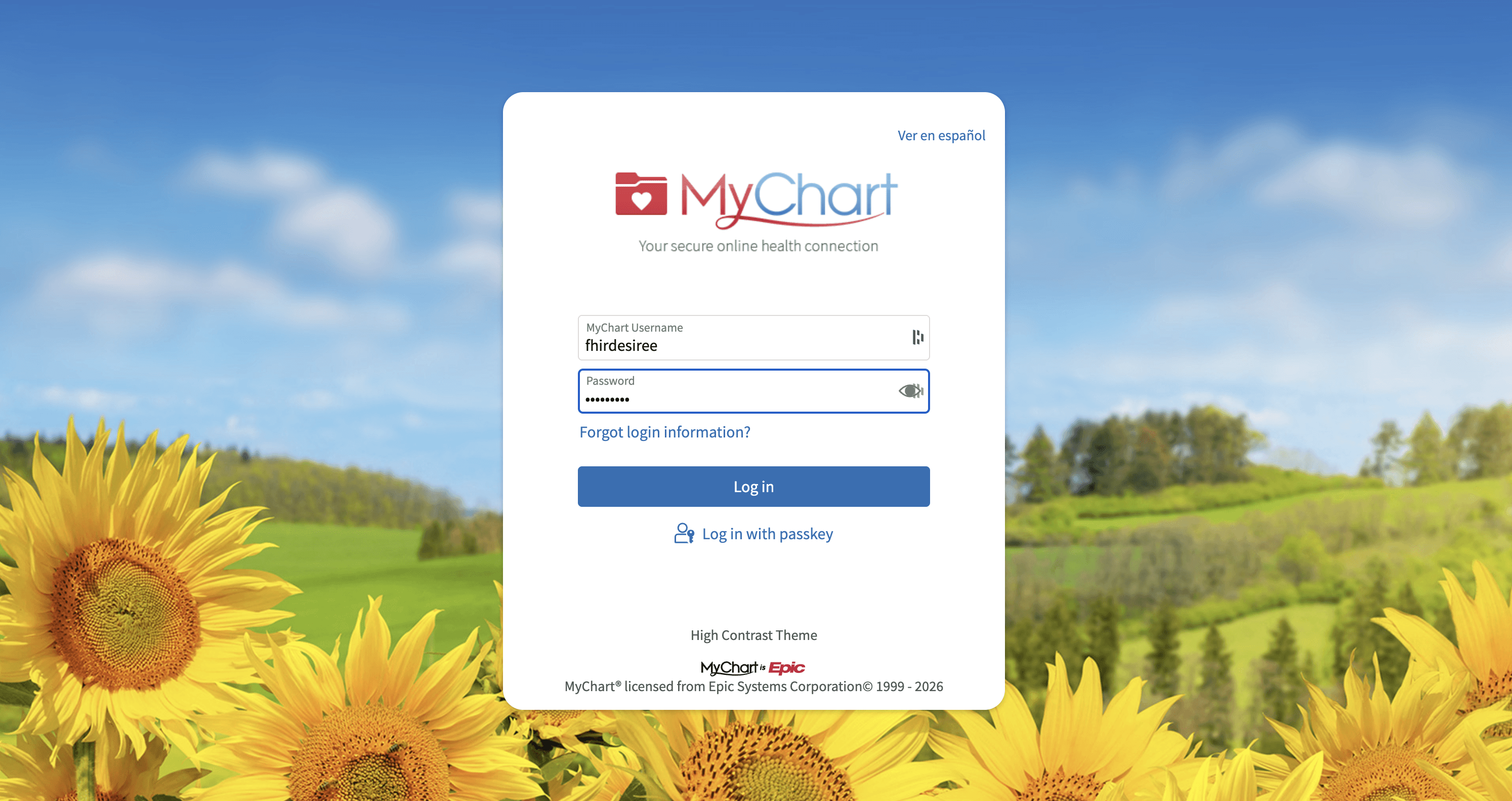
To make testing easier, Epic provides a set of public patient accounts that could be used to test the OAuth flow. For this walkthrough example, we’ll use Epic’s MyChart sandbox environment, specifically using the fhirdesiree account since it has built-in immunization records.
After signing in, the user needs to explicitly grant access to the application. Typically, this involves app developers sharing their business name, as well as what data they’re requesting. Then, the user needs to explicitly grant what data should be shared with the application. This could include things such as clinical notes, care plans, health issues, specimens, and vital signs:
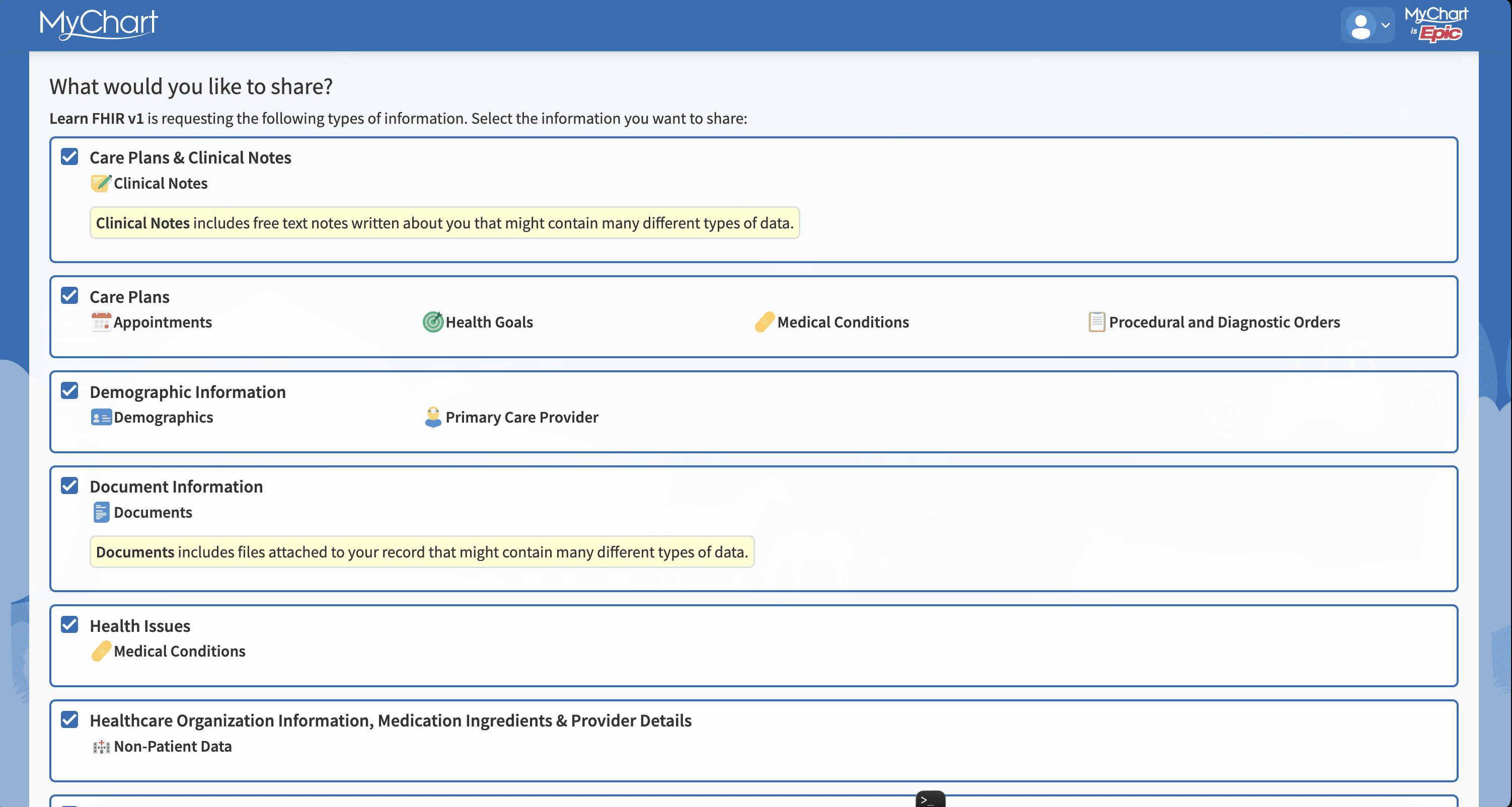
In the screenshot below, I checked all the boxes to allow sharing of the data types requested by the app. Now that it has access, the application can call FHIR endpoints to access the patient data (i.e., the test patient’s data).
I specifically designed my application so I can toggle between endpoints and see the raw JSON output:
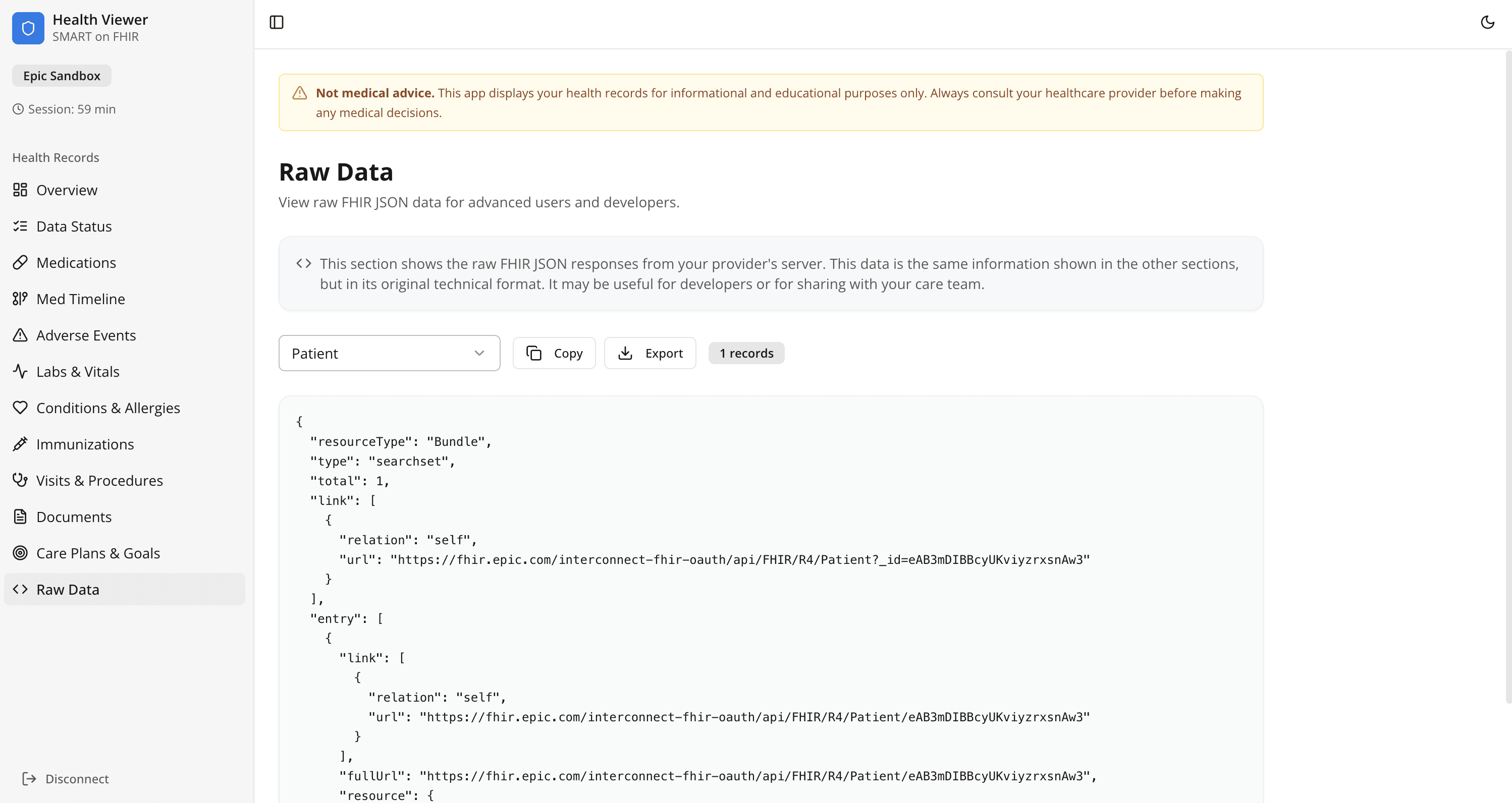
For example, the immunization data for this sample patient is easily readable:
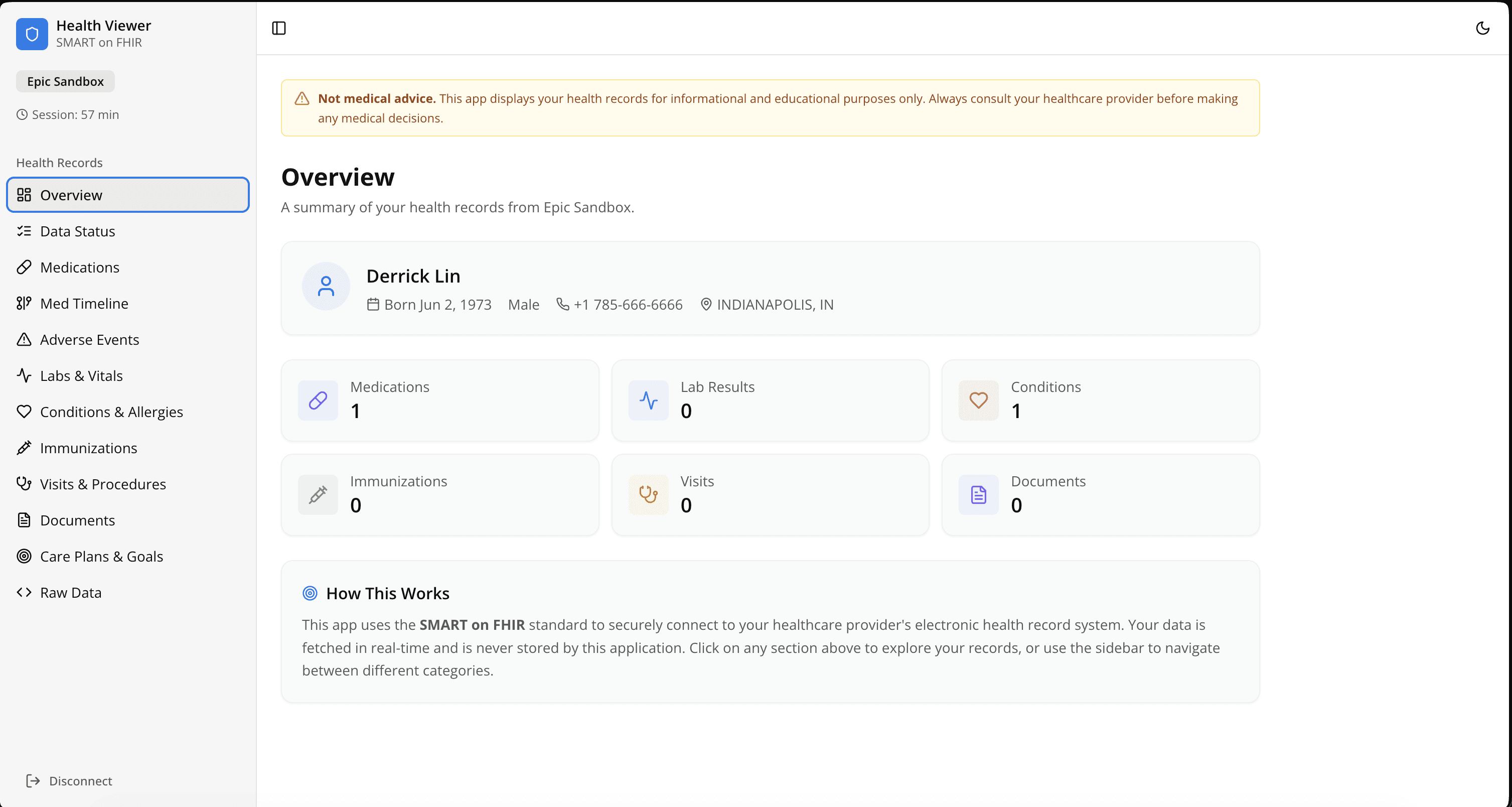
From here, the data needs to be cleaned, given arbitrary formatting, and unstructured documents need to be parsed. After, it could be displayed in whatever way the app developer sees fit:
Common pitfalls
This guide might position creating a FHIR application as a very straightforward process, but I did run into a few pitfalls.
Documentation
On a scale of Linux man pages to Stripe API documentation, FHIR documentation is closer to the former. It’s dense, detailed, and not presented in the most modern interface. Generally speaking, it’s less designed for private citizens and more for veteran engineers in the healthcare space. This invariably leads to some intuition being required when writing an implementation.
Cross-vendor implementation
While SMART makes it easier to deploy applications across multiple vendors, different vendors implement FHIR data differently. This requires developers to write error-handling logic to handle unknown edge cases and bridge code to support esoteric implementations. Some things, like immunization records, are more standardized. Others, like clinical notes, are more prone to custom implementations.
Build that app
Of course, fetching data is only the first step. In real healthcare environments, engineers also have to account for inconsistent documentation, missing fields, varying EHR implementations, authorization constraints, auditability requirements, privacy requirements, and clinical context.
That’s what makes healthcare data engineering challenging — and interesting. Standards like FHIR create a foundation, but building reliable systems on top of healthcare data still requires careful engineering.
The best part about FHIR is that, despite some hoop-jumping, it allows anyone to build a clinical application and helps organize one of the most complex data-organization challenges.
I was able to build a pretty strong FHIR demo during an AKASA Hackathon, and while I have some background in health tech, I’d wager that the average developer could accomplish the same feat.
We need more developers solving clinical and healthcare challenges, so I encourage anyone who’s curious about the space to try their hand at FHIR.
Alternatively, if you are interested in the problems that AKASA is solving, please check out our jobs board.
Note: Epic is a trademark of Epic Systems, and Cerner is a trademark of Cerner Innovation, Inc. (part of Oracle Health)

Armaghan Behlum
Armaghan Behlum is a director of engineering at AKASA. An experienced engineer of multiple styles (backend, full-stack, Android/mobile, etc.), he has worked for companies such as Verily Life Sciences, Google, and Audible. Behlum has a degree in computer science from Harvard University.